Call us: +35777778666


Records and Information Management
Smart Sort
Sort, organise, and manage physical files at scale with smart sorting technology designed to simplify enterprise file management.
Contact SalesSort commingled files

Unmingle your commingled files with Iron Mountain Smart Sort
Disorganised records do more than inflate storage costs and litigation risks. They also keep critical information hidden when your business needs it most.
But what if you could efficiently unmingle your commingled files and know what to retain, digitise, and destroy, all without a complex, labour-intensive discovery project?
With Iron Mountain Smart Sort, you can.
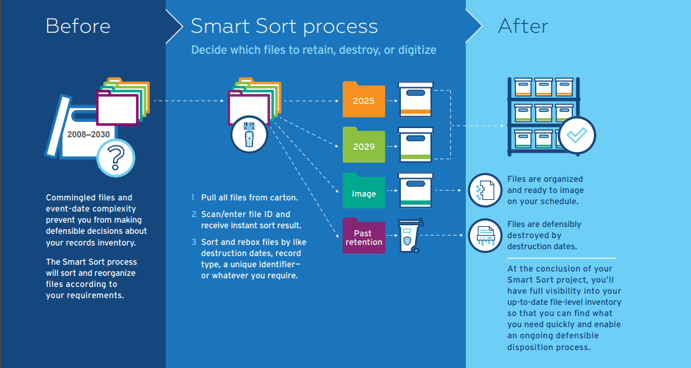
The benefits of our Smart Sort solution for UK firms
✓ Find records quickly and accurately
✓ Make defensible decisions about what records to keep, destroy, or digitise
✓ Reduce the cost and risk of records storage
✓ Support office reconfigurations and closures
✓ Accelerate digital transformation
✓ Navigate mergers, acquisitions, and divestitures quickly
Contact us to learn more


Frequently asked questions
Smart Sort is a simple and budget-friendly solution to help you finally gain control of your records inventory.
Is Smart Sort only for records stored at Iron Mountain?
What if I have records stored in multiple locations or with various vendors?
What does it take to start the Smart Sort process?
Does Smart Sort support multiple records retention policies and record types?
What record types are recommended, and which are not, for a Smart Sort project?
Am I required to use Smart Sort on my entire inventory or can I proceed with a phased approach?
I need a defensible process for records destruction. How can Smart Sort help?
- The Smart Sort process leverages your retention schedule and rules to create a standardised methodology for file review and processing. This rules-based approach allows us to deliver a consistent and defensible output.
- At the end of the Smart Sort process, we will provide a report that gives you file-level visibility and the corresponding disposition for each file. This report enables you to defend the actions taken on each file.